Opening repertoire trainer

Master your openings, and know exactly where you leave them.

Build your opening repertoire, train it with spaced repetition, and let Chess Second check your real Lichess and Chess.com games for the exact move where you went off your preparation.

Coming soon to theApp Store Coming soon onGoogle Play

Free to start · no account needed · unlimited books

Your game follows your book for three moves, then at move 4 you played 4.Ng5 while your book has 4.d3, with a Train this button
Works with
  • Lichess games, studies and opening explorer
  • Chess.com games
  • Stockfish on your phone
  • PGN in and out, for ChessBase and more
How it works

A repertoire that learns from your games

Most opening trainers drill the theory you typed in. Chess Second closes the loop: every game you play tells it what to train next.

A loop of four steps: build your book, play your games, Game Radar checks them, train what you missed, and back again after every game
  1. BuildFrom your own games, a ready-made catalog book, a PGN, or move by move on the board.
  2. PlayKeep playing on Lichess and Chess.com, the way you always do.
  3. RadarGame Radar finds the first move in each game where you left your book.
  4. TrainMissed positions go into Smart review and come back until you play them without thinking.
Signature feature

Build a repertoire from your own games

You already have a repertoire. You just haven't written it down. Chess Second reads your games and turns the openings you play most into books, so you never retype the same lines by hand again.

  1. Choose your games. Pick your Lichess and Chess.com accounts, the time controls you care about, a date range (30 days, 90 days, a year or custom), and White, Black or both.
  2. One book per opening. Games are grouped by opening and color, so the Sicilian as Black and the London as White each get their own book, named for you.
  3. Only moves you really play. A move of yours goes into the book only if you played it at least twice in that position. Lines go up to move 20, and Stockfish checks every candidate, so one-off blunders stay out.
  4. You stay in charge. New books arrive as drafts. Keep all of them, or only the ones you want. Books you keep are never changed by a later build.
Games from Lichess and Chess.com flowing into opening trees, one per opening and color
After 1.e4 c5, you played
2.Nf3 ×14 2.Nc3 ×6 2.Qh5 ×1
Played twice or more and engine-checked: kept. Played once: left out.

Building runs in the background, so you can keep using the app. It tells you when your books are ready to review.

Signature feature

Game Radar: catch every move where you left your book

Game review tools tell you how accurate a whole game was. Game Radar answers a sharper question: where did I stop playing my preparation?

  1. Link your accounts. Add your Lichess and Chess.com usernames. Refresh pulls in your latest blitz, rapid and daily games.
  2. Every game checked against your books. Chess Second walks each game through all your books and stops at the first move that isn't in them: "You played 4.Ng5, book has 4.d3." Tap it to open the position with your notes, the explorer and the engine.
  3. Straight into training. Fix the book, or train the miss right away. Misses from recent games are added to Smart review automatically, so the same mistake comes back until it's gone.
  4. See what leaving costs you. Results by book compare your score when you stayed in book with your score when you left early. Leaks are the spots where you keep leaving your book. Holes are opponent replies your book doesn't cover yet.

Archive misses you've dealt with. Paste a PGN to add over-the-board games or games from other sites.

Five recent games drawn as lines: two Italian games leave the book at move 4, marked as a leak; a London game hits a hole at move 6; others stay in book. Below, your score in the Italian Game is 64% when you stay in book and 38% when you leave early
Free for everyone

A catalog of ready-made repertoires, free and growing

Not sure what to play? Start from a repertoire that has already been put together and checked for you, then make it yours.

  • Vetted before it's published. Every catalog book is reviewed, so you start from sound lines instead of random internet PGNs.
  • Free, with no account. Browse and download any catalog book on the free plan.
  • Pick your level. Each book shows its color, level from Novice to Advanced, how many positions it has, and a short idea of what it's about.
  • Always growing. New repertoires are added to the catalog regularly, and updates show their date.
  • Yours to change. A downloaded book is a normal book: add your own lines and comments, train it, and let Game Radar check your games against it.
Catalog books: Italian Game for White at Novice level, Caro-Kann for Black at Intermediate, Alapin Sicilian for Black at Advanced, and a new Queen's Gambit book, each reviewed and free, with new repertoires added regularly
Everything else

A complete opening trainer

Around the signature features is everything you need to build, study and drill your repertoire. Most of it is free and works without an account.

Free

Build on the board

Every move you play is saved to your book. Green arrows show what your book already covers. Go back a move to add a branch, and add a comment to any position.

Free

See what players actually play

The opening explorer shows every reply with how often it's played and how it scores, from Masters or Lichess games. Prepare for the likely move, not just the best one.

Free

Stockfish on your phone

A full engine runs on your device with no connection. Study Mode shows the best move as a blue arrow and lets you test ideas without touching your book.

FreePremium

Training that adapts to you

The app plays the other side and you find your move. Get it wrong and that position comes back sooner. Get it right and it waits longer. Train the Entire repertoire or From this position for free, or use Smart review, Personalized, Main lines only, Often failed and New positions with Premium.

Free

Your progress at a glance

Accuracy, streak, a calendar of training days, your hardest positions, and your score with each book in real games.

Free

PGN in, PGN out

Import PGN text, a file or a Lichess study without losing what you have. Export any book with comments for Lichess, ChessBase or anything else.

Premium

Prepare with your second

Share a book with a coach or partner as Can view or Can edit. Cloud backup keeps every book safe on a new phone.

FreePremium

Tuned to your rating

At 1590, training follows players rated 1600 to 1800, the opponents you actually meet. Connect Lichess to train on the replies you really face.
  • 4 color schemes with light and dark modes
  • Sound and vibration for right and wrong moves
  • 15 languages, including Urdu, Hindi and Arabic
  • Works offline: building, training and the engine
The real thing

See it in the app

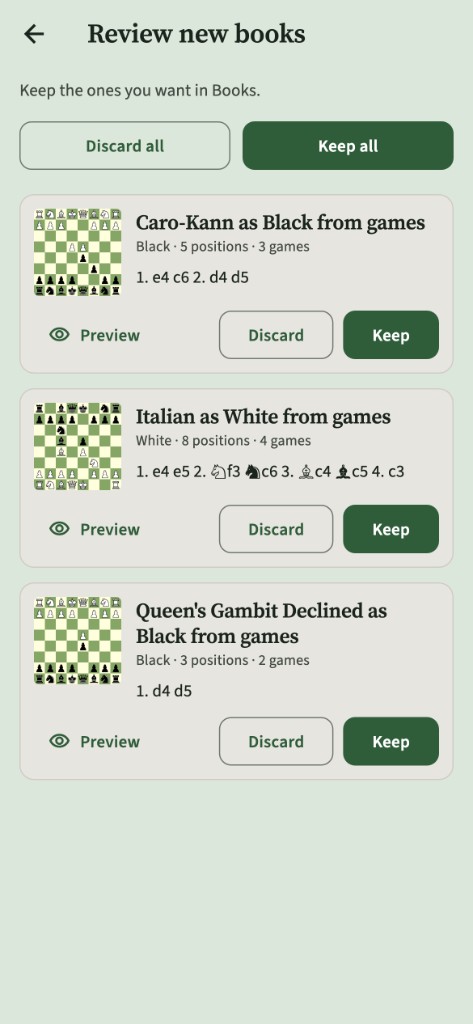
Reviewing new books built from your games
Books built from your games
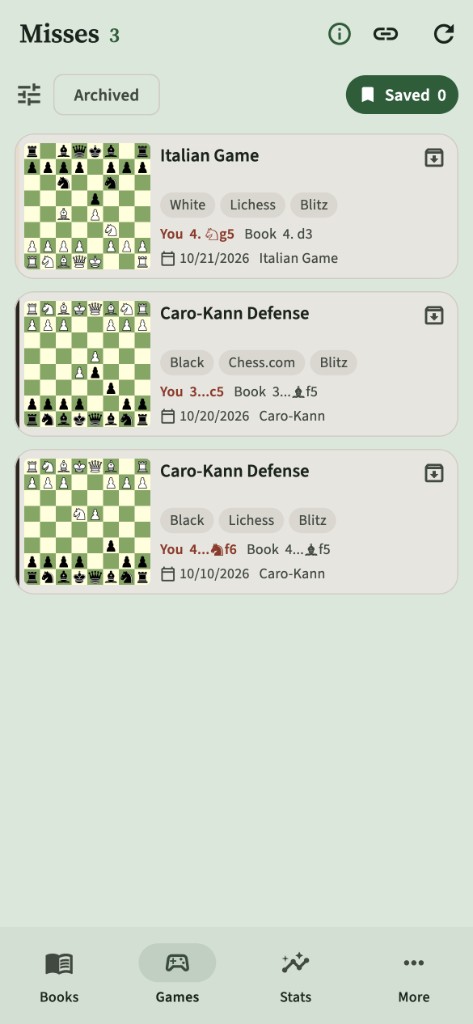
Game Radar misses list with your move and the book move
Game Radar misses
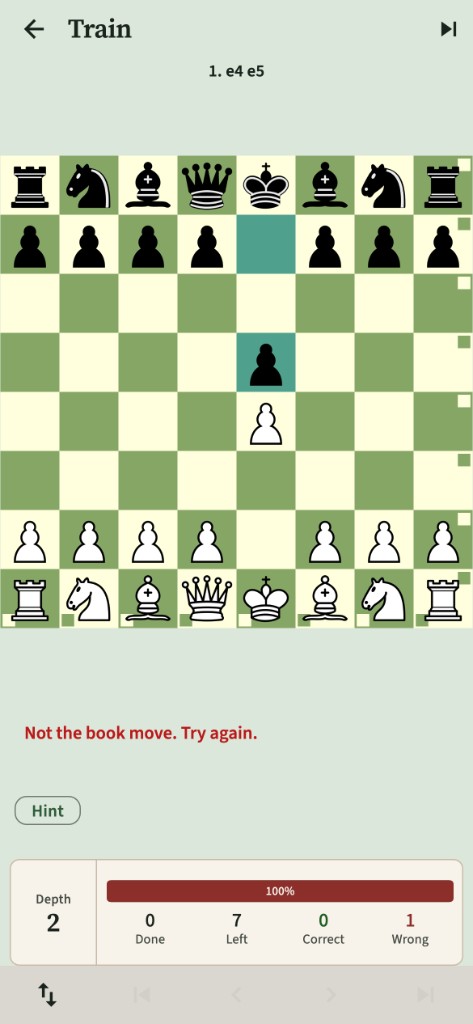
Training: not the book move, try again
Training
Pricing

Free to start. Premium when you're ready.

Everything you need to build and drill a repertoire works without Premium, and you don't need an account.

Free

Your books stay on your phone.

  • Unlimited books, moves and comments
  • The full catalog of ready-made repertoires
  • PGN, text and Lichess study import and export
  • Train a full book or one branch
  • Misses list and a taste of Game Radar
  • Opening explorer and on-device Stockfish
  • Statistics and color schemes
Before you start

Questions

What is an opening repertoire?

It's your personal set of opening moves for White and Black: what you play, and what you answer to each reply. In Chess Second, each repertoire is a "book", a tree of moves for one color that you build and then train.

How is this different from other opening trainers?

Most trainers only drill the lines you type in. Chess Second also starts from your real games: it builds books from what you actually play, and Game Radar checks every new game to show where you left your preparation.

Is the catalog really free?

Yes. Every book in the catalog is free to download on the free plan, with no account. New repertoires are added regularly. Once downloaded, a catalog book is yours to edit and train like any other book.

Do I need a Lichess or Chess.com account?

No. You can build books by hand, use the catalog, import PGNs and train without one. Linking a username lets Chess Second download your public games for Game Radar and for building books from your games. Games stay on your phone.

Do I need to create a Chess Second account?

No. The trainer works signed out. You only need an account for Premium features like cloud backup and sharing.

Will building from my games overwrite my books?

Never. Building always creates new draft books for you to review. Books you've kept are never edited by a later build.

Does it work offline?

Building, training and the Stockfish engine all work offline. Refreshing games, the opening explorer and cloud backup need a connection.

Is Chess Second affiliated with Lichess or Chess.com?

No. Chess Second uses their public game APIs and the Lichess opening explorer, and isn't affiliated with or endorsed by either. Stockfish is open-source software under the GNU GPLv3.

Stop leaving your book.

Chess Second is coming soon to iPhone and Android.

Coming soon to theApp Store Coming soon onGoogle Play